If you’re not too sure about how to change your hair in Heartopia, I’ve written up this guide just for you! Customisation is a key part of Heartopia, so of course, we want to try out new hairstyles. Don’t forget to redeem Heartopia Codes before they expire for a range of free rewards.
Made your character, and now that you’ve played a bit of the game, you want a fresh hairstyle? Trust me, I’ve been there. Luckily, I’ve found out how to change your hair at any time in Heartopia! However, you must first unlock the feature.
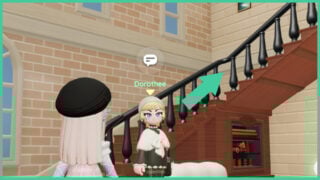
As you play through the initial quests of the main story, you’re also completing the tutorial tasks. One of these is the Clothing Shop questline featuring the NPC, Dorothee. While inside Morin’s Clothing Store, managed by Dorothee, you need to head up the staircase to the second floor.
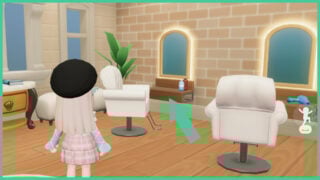
Once here, you will find chairs in front of mirrors, with shelves decorated with a hairdryer and assorted bottles. Walk over to either of the mirrors and interact with one of them to edit your character’s appearance in the Salon.
Within the Salon menu, you can click the scissors icon to browse a variety of hairstyles, many of which will be locked for now if you’re new to the game. Some cost Gold, others cost Wishing Stars, and there are a few locked behind the gacha banners and the in-game shop.
Once you’ve unlocked a hairstyle, you can click the colour dropper icon to the left of your character to change the colour of your new ‘do!
There’s a selection of hairstyles from the initial character customisation screen that are completely free for you to use, so if you don’t want to spend any Gold or Wishing Stars, this is another good option.
As you work through these, as well as Bob’s quests, you eventually unlock the Custom Closet feature. Upon unlocking this feature, a new app is added to your in-game mobile phone. This app is called ‘Dress-Up‘! Here, you can customise your everyday and sleepwear outfits whenever you want.
The post How to Change Your Hair in Heartopia appeared first on Gamezebo.